Documentation
Abstract
Isra36 can be useful for developers who forget SQL query syntax, or good in other programming languages, know logic but don't remember SQL syntax. Currenlty, the main goal is to generate code that is free from SQL syntax errors. As you will see below in example, complex task will require 2,3 auto-error fixing itterations.
What isra36 does?
- It generates an SQL query based on your prompt. Then it creates an isolated sandbox with the necessary tables and mock data according to your prompt, and executes the query. If the generated query doesn't work, it will try to fix it in a self debugging iteration loop (we have a limit of 4 iterations).
- When using LLMs (GPT, Claude, etc.) you can generate a very large SQL query, but it can take a lot of time to debug and understand what is wrong. Or you can generate queries using an LLM's step-by-step process, but in that case you always need to double-check whether the newly generated query works or not in some environment. isra36 automates these steps.
What isra36 does not do?
- It doesn't connect to your database. You get only the working SQL query, details of the process and the state of isolated sandbox environment, so you will be sure that the query is working, and doesn't need to double-check. Benefits: privacy. If you think that some features (connect to database, optimize query, e.t.c) can be helpful for developers, please ask in Feedback section.
- However, we have plans to give an ability to upload your schema without any data. In this case isra36 will decide which tables are required for this task, and will generate sandbox with neccessary tables and mock data. So you can just copy and paste query. Please visit our Roadmap page for more details and help us to shape the future of this project. Currently we are validating this idea.
- It doesn't optimize your query. Hope yet :)
Real usage example:
At work, I was tasked with creating a custom report for a client. The task required getting the number of EntityA (let's say it was Products) by it's width and height, grouped by nested and one to many related categories.
And here is the prompt I used for isra36:
Here is the screenshot of the isra36 result:
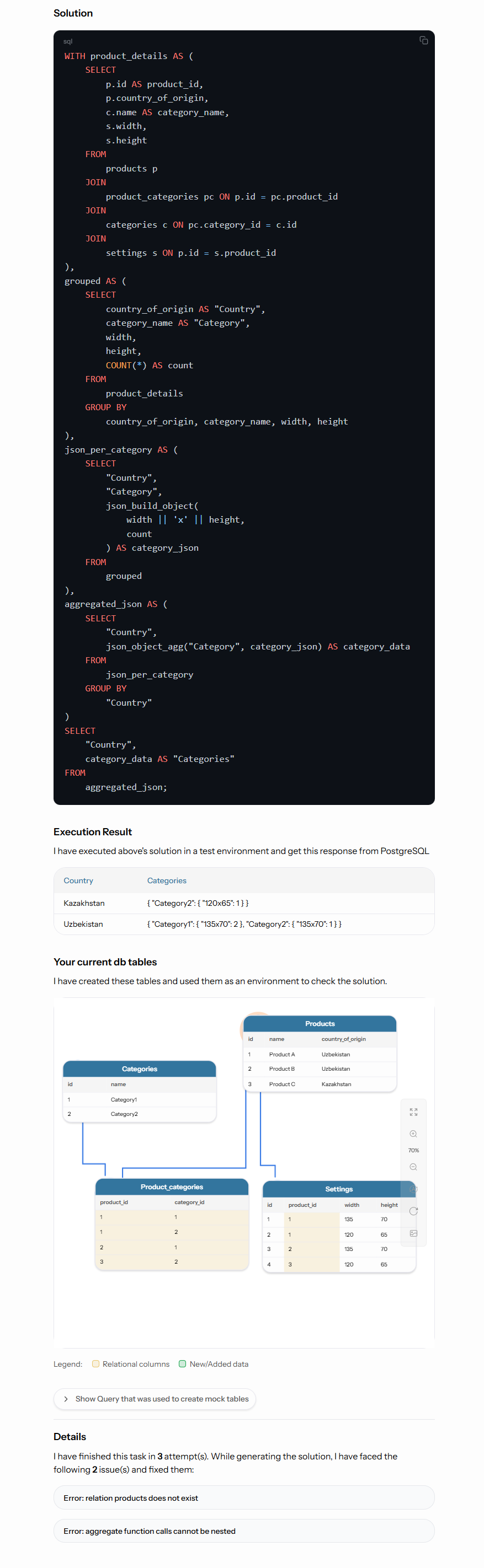
It generated SQL query and finished in 3 attempts (see the bottom of the image). It means it generated 1st query to solve your task, run it in a sandbox, get error, fixed, get another error, fixed again and finally got the SQL query that works and returned the Execution result.
You can see how it worked step by step. By comparing "Execution result" with "Your current db tables" you can double-check if it performs as expected. We have plans to automate and help user to double-check. For more details please visit Roadmap page.
And as you can see this method isolates the task and uses only required tables and columns. This was the main purpose of using the sandbox.
Instead of Scientific results
We have tested the `How to check if all {pattern}_id foreign columns have indexes or not through all tables` complex prompt with gpt-4.1-nano and it was performed successfully in 2 iterations (with 1 error). That means this technique can be used to generate working SQL queries even with small models. But of course isra36 in production uses more complex model. Currently it is gpt-4.1.
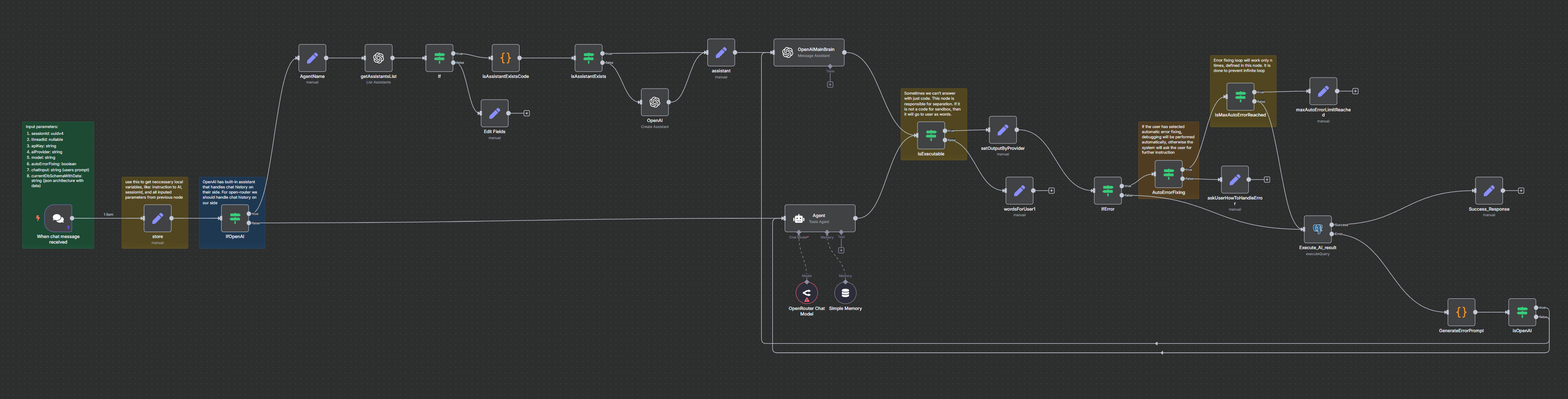
The core of our platform, Ai agent built on N8N, is now open source
View on GitHubContact us: contact@isra36.com